
SEO
How to Create Quality Backlinks for Your Website? A Step-by-Step Guide


Backlinks are one of the most important factors in search engine optimization (SEO). They are links from other websites to your own website, and they act as a vote of confidence in your website’s authority and quality. The more high-quality backlinks your website has, the higher it will rank in search engine results pages (SERPs). This means that more people will see your website when they search for keywords related to your business or industry.
There are many different ways to create backlinks, but not all of them are created equal. Some backlinks are more valuable than others, and some backlinks can even hurt your SEO.
In this article, I will show you how to create high-quality backlinks that will help you improve your website’s ranking and visibility in search engines.
Step 1: Create high-quality content
The best way to attract backlinks is to create high-quality content that is informative, engaging, and useful to your target audience. When you create high-quality content, other websites are more likely to link to it.
Here are some tips for creating high-quality content:
- Write content that is relevant to your target audience.
- Write content that is informative and engaging.
- Write content that is well-written and free of errors.
- Write content that is unique and original.
- Promote your content on social media and other websites.
Step 2: Guest blog
Guest blogging is a great way to get backlinks from high-quality websites. When you guest blog, you write an article for another website in your industry. In return, the website will typically give you a backlink to your own website.
To find guest blogging opportunities, you can use a search engine to search for “guest post” or “write for us” opportunities. You can also reach out to websites directly to see if they are accepting guest posts.
When you write a guest post, be sure to write high-quality content that is relevant to the website’s audience. You should also include a link back to your own website in your author bio.
Step 3: Broken link building
Broken link building is a technique where you find broken links on other websites and then contact the website owner to let them know. If the website owner fixes the broken link, they may also link to your website as a replacement.
Step 4: Build relationships with other websites
One of the best ways to get backlinks is to build relationships with other websites in your industry. You can do this by commenting on other websites’ blog posts, sharing their content on social media, and guest blogging for their websites.
When you build relationships with other websites, they are more likely to link to your website in the future.
Step 5: Promote your website on social media
Social media is a great way to promote your website and attract backlinks. When you share your content on social media, be sure to include a link back to your website.
You can also use social media to connect with other websites in your industry. Once you have connected with other websites, you can start building relationships with them.
Step 6: Use a link-building tool
There are a number of link-building tools available that can help you find and create backlinks. These tools can be helpful, but it is important to use them carefully.
Some link-building tools can generate low-quality backlinks that can hurt your SEO. It is important to only use link-building tools that generate high-quality backlinks.
Conclusion
Creating high-quality backlinks is one of the best ways to improve your website’s ranking and visibility in search engines. By following the tips in this article, you can start creating backlinks that will help you achieve your SEO goals.
Here are some additional tips for creating quality backlinks:
- Avoid link schemes. Link schemes are attempts to manipulate search engine rankings by building artificial links. Search engines can detect link schemes, and they can penalize websites that use them.
- Focus on getting backlinks from high-quality websites. Backlinks from high-quality websites are more valuable than backlinks from low-quality websites.
- Get backlinks from diverse websites. Don’t just focus on getting backlinks from websites in your own industry.
Discover more from Remote Work Tips
Subscribe to get the latest posts sent to your email.
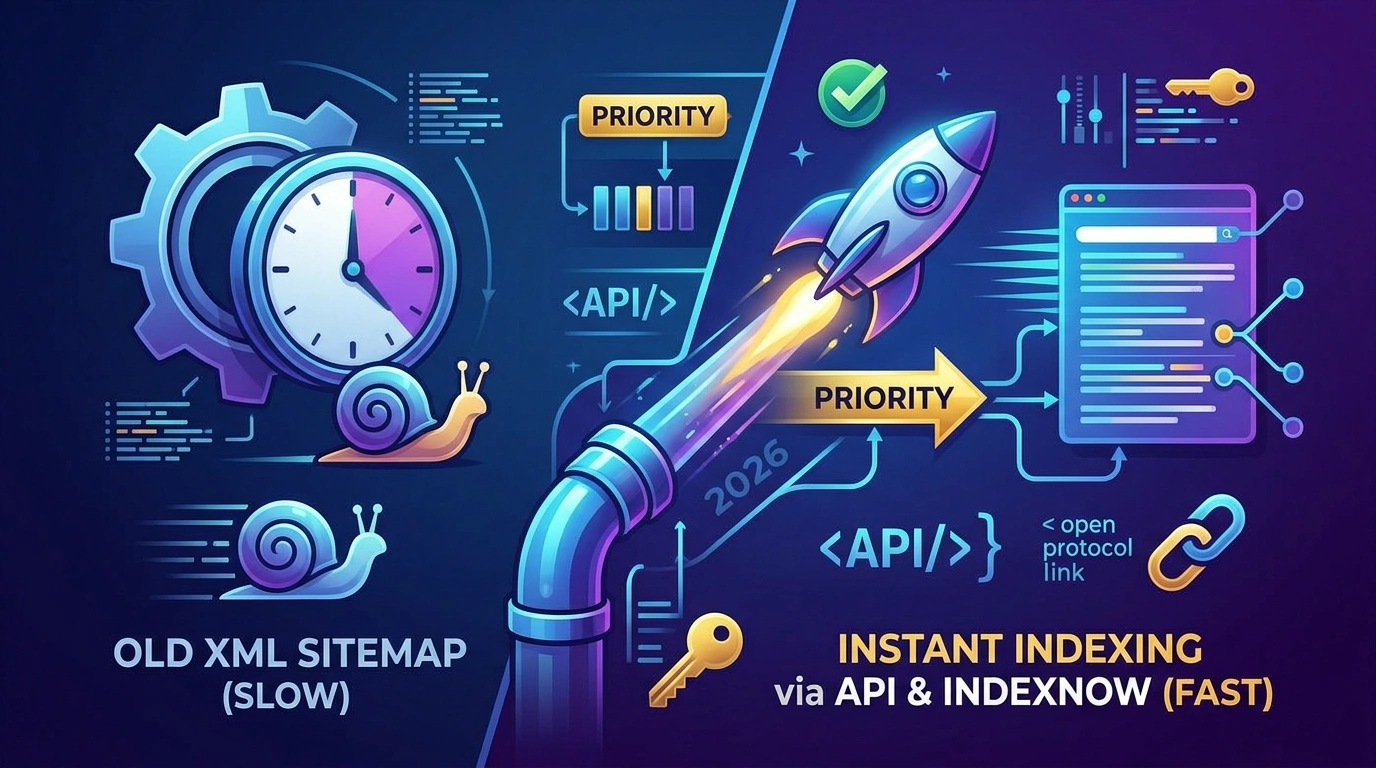
The traditional SEO model of publishing a post and passively waiting weeks for Googlebot to crawl your XML sitemap is dead. In the fast-paced 2026 digital landscape, search engines are allocating their crawl budgets more strictly than ever. For freelance developers and SEO consultants, this shift presents a highly lucrative opportunity: businesses are actively seeking technical specialists who can guarantee their new products, news, and generative AI content are indexed and ranking within hours, not weeks.
By mastering programmatic indexing protocols like the Google Indexing API and IndexNow, you can transition from selling standard “SEO optimization” to offering high-ticket “Instant Indexing Infrastructures.” This guide breaks down exactly how to implement these protocols for your clients, the technical nuances to navigate, and how to monetize this highly demanded skill.
How Do You Achieve Instant SEO Indexing in 2026?
To instantly index website content in 2026, webmasters must bypass passive XML sitemap crawling by programmatically pushing URL updates directly to search engines. For Google, this involves utilizing the Google Cloud Indexing API via a verified Service Account to trigger immediate crawls. For Microsoft Bing, Yahoo, and Yandex, implement the IndexNow protocol by hosting a verification .txt key at the server root and sending HTTP POST requests to automatically notify participating engines of new or updated content.
The Google Indexing API: Pushing Content to the Top
The Google Indexing API allows site owners to directly notify Google’s servers the exact moment a page is added, updated, or removed. Rather than waiting for a scheduled crawl, this API places your URLs in a high-priority queue.
Official vs. Unofficial Capabilities
According to official Google Search Central documentation, the Indexing API is strictly intended for pages containing JobPosting or BroadcastEvent structured data. For sites with highly volatile inventory (like daily job boards or livestream schedules), it keeps search results fresh by pushing updates individually.
However, technical SEO communities have long documented that implementing the API across standard eCommerce products and news articles frequently triggers successful, rapid indexing. While doing this operates in a gray area of Google’s official guidelines, the underlying mechanics remain the same.
Step-by-Step Implementation Framework
- Google Cloud Provisioning: Create a new project within the Google Cloud Console and enable the “Web Search Indexing API.”
- Service Account Creation: Generate a new Service Account and download the JSON key file. This file contains the cryptographic keys your script (or WordPress plugin) needs to authenticate.
- Search Console Authentication: This is the step most beginners miss. You must add the Service Account’s email address as an Owner in the Google Search Console property of the target domain.
- Sending the Payload: Using Node.js, Python, or a CMS plugin, send a POST request to
[https://indexing.googleapis.com/v3/urlNotifications:publish](https://indexing.googleapis.com/v3/urlNotifications:publish)with the target URL and theURL_UPDATEDorURL_DELETEDtype.
Quota Limitations: Google provisions a strict default limit of 200 API calls per day per project. For enterprise clients, you must request quota increases directly through the Cloud Console.
IndexNow: The Open-Source Future of Crawling
While Google maintains its proprietary API, the rest of the search landscape has unified under IndexNow. Supported by Microsoft Bing, Yandex, Seznam.cz, Naver, and Yep, IndexNow is an open-source ping protocol.
The defining advantage of IndexNow is its co-sharing mechanism. Search engines adopting the protocol agree to automatically share submitted URLs with all other participating search engines. You ping one; you update them all.
Implementing the IndexNow Protocol
Setting up IndexNow is significantly lighter than Google’s API, making it an easy “quick win” to offer clients:
- Key Generation: Generate an API key (a minimum of 8 and a maximum of 128 hexadecimal characters).
- Server Root Verification: Host a UTF-8 encoded text file named
{your-key}.txtat the root directory of the client’s website (e.g.,[https://www.example.com/3f2fa233444b4e87a5c40277499c4be4.txt](https://www.example.com/3f2fa233444b4e87a5c40277499c4be4.txt)). The file must contain the exact key string inside. - Triggering the Ping: To submit a single URL, you can fire a simple HTTP GET request.
- Example:
[https://www.bing.com/indexnow?url=https://www.example.com/product-page&key=your-key](https://www.bing.com/indexnow?url=https://www.example.com/product-page&key=your-key)
- Example:
- Batch Submissions: For bulk updates, you can submit up to 10,000 URLs per POST request using a JSON payload containing the
host,key, and anurlListarray.
Actionable Next Steps: Monetizing Your Indexing Skills
Do not sell “Google Indexing API setup” as an hourly task. Package this as a high-value technical infrastructure upgrade.
- The “Instant Index” Audit ($250 – $500): Audit a client’s current indexation ratio (pages published vs. pages indexed in Google Search Console).
- The Technical Implementation ($500 – $1,200): Set up the Google Cloud project, configure the Service Account, generate the IndexNow key, place it on their server, and configure their CMS (via custom PHP or headless architecture) to trigger pings on publish.
- The Retainer ($150/mo): Monitor API error logs, manage the 200-URL daily quota limitations, and maintain the JSON key security.
Frequently Asked Questions (FAQ)
Can I use the Google Indexing API for any type of website?
Officially, Google states the API is only for JobPosting and BroadcastEvent data. Any attempt to abuse the API to spam the index could result in your access being revoked. However, many technical SEOs successfully use it for standard pages, provided the content is high quality and not manipulative.
Do I still need XML sitemaps if I use IndexNow and the Indexing API?
Yes. Both Google and the IndexNow consortium explicitly state that APIs are meant to supplement, not replace, traditional sitemaps. The APIs handle rapid updates for volatile content, while XML sitemaps provide a comprehensive map for the complete structural coverage of your site.
How do I know if my IndexNow ping was successful?
A successful HTTP GET or POST request to the IndexNow endpoint will return an HTTP 200 response code. This confirms the search engine has received the URL, though it does not guarantee immediate inclusion in search engine results pages (SERPs).
Discover more from Remote Work Tips
Subscribe to get the latest posts sent to your email.

Are you a web designer or web developer looking for ways to make more money? With the rise of e-commerce and online businesses, the demand for skilled professionals in web design and development has skyrocketed. In this blog post, we will discuss some practical tips and strategies on how you can increase your income as a web designer or web developer.
1. Build a Strong PortfolioYour portfolio is your best marketing tool. It showcases your skills and expertise to potential clients. Make sure your portfolio is up-to-date and showcases your best work. You can also include client testimonials to add credibility to your portfolio.
2. Offer Additional ServicesDon’t limit yourself to web design or development. You can offer additional services such as website maintenance, website security, or even website hosting. These services can provide an additional stream of income for you.
3. Upsell Your ServicesWhen working with a client, always look for opportunities to upsell your services. For example, if a client hires you to design a website, you can offer additional services such as logo design or social media management. By offering more services, you can increase your income per client.
4. Participate in Online MarketplacesThere are many online marketplaces where you can sell your services as a web designer or web developer. Some popular marketplaces include Upwork, Freelancer, and Fiverr. These marketplaces connect you with potential clients and provide a platform for you to showcase your work.
5. Create Your ProductsCreating your digital products such as website templates, WordPress themes, or plugins can be a great way to generate passive income. These products can be sold on your website or online marketplaces such as ThemeForest or CodeCanyon.
6. Teach OthersIf you have expertise in web design or development, you can share your knowledge with others through online courses or tutorials. Platforms such as Udemy or Skillshare allow you to create your own courses and earn money from students who enrol in your courses.
In conclusion, as a web designer or web developer, there are many ways to increase your income. By building a strong portfolio, offering additional services, upselling your services, participating in online marketplaces, creating your products, and teaching others, you can boost your income and take your career to the next level.
Discover more from Remote Work Tips
Subscribe to get the latest posts sent to your email.

Introduction:
In today’s digital era, a strong online presence is paramount for businesses and individuals. Whether you’re a blogger, an entrepreneur, or a small business owner, search engine optimization (SEO) is a fundamental strategy that can help you rank higher in search engine results, drive more organic traffic, and increase your online visibility. In this blog post, we will explore the basics of SEO and provide practical tips to improve your website’s performance in search engines.
Understanding Search Engine Optimization:
Search engine optimization refers to optimizing your website and content to improve its visibility in search engine results pages (SERPs). When you search for a specific query on search engines like Google or Bing, the search algorithms which define the order of displayed results consider various factors. SEO is all about aligning your website and content with these factors to increase your chances of ranking higher in SERPs.
On-Page SEO:
On-page SEO involves optimizing various elements on your website itself to improve its ranking. Here are some important on-page SEO factors and techniques:
Keyword research: Identify relevant keywords and incorporate them appropriately in your website’s content, meta tags, headings, and URLs.
Quality content: Create high-quality, relevant, and engaging content that aims to answer users’ search queries.
Page titles and meta descriptions: Craft enticing and SEO-friendly titles and meta descriptions to increase click-through rates from search results.
URL structure: Use descriptive and concise URLs that include relevant keywords.
Optimized images: Optimize images by compressing their size and using appropriate alt tags.
Off-Page SEO:
Off-page SEO focuses on improving your website’s reputation and authority through external factors. Backlinks from reputable websites, social media signals, and online mentions are crucial for off-page SEO. Here are some effective off-page SEO techniques:
Link building: Create high-quality and relevant backlinks from authoritative websites within your niche.
Social media engagement: Build a strong presence on social media platforms and encourage shares, likes, and comments on your content.
Online directories and listings: Submit your website to relevant online directories and listing platforms to boost your online visibility.
Guest blogging: Contribute guest posts to reputable websites within your industry and include links back to your website.
Technical SEO:
Technical SEO focuses on optimizing the technical aspects of your website to improve its performance and crawlability. Here are some key technical SEO considerations:
Website speed: Ensure your website loads quickly to improve user experience and reduce bounce rates.
Mobile responsiveness: Optimize your website’s design and functionality for mobile devices.
XML sitemaps: Create and submit them to search engines to help them understand and crawl your website more efficiently.
URL canonicalization: Set preferred URLs to avoid duplicate content issues.
SSL security: Install an SSL certificate to make your website secure and improve its search engine rankings.
Conclusion:
Search engine optimization is an ever-evolving practice that can significantly impact your online visibility and success. By implementing the strategies and techniques outlined in this blog post, you can lay a solid foundation for improving your website’s performance in search engine results. Remember that SEO is a long-term process, and staying updated with the latest trends and algorithms is essential. So, invest your time wisely in optimizing your website and enjoy the fruits of increased organic traffic and higher search engine rankings.
- What is search engine optimization (SEO)?
Search engine optimization, or SEO, is the practice of optimizing your website and its content to improve its visibility in search engine results pages (SERPs). It involves various techniques to ensure that search engines understand the relevance and value of your website, ultimately leading to higher rankings and increased organic traffic.
- How does SEO work?
Search engines use algorithms to determine the relevance and quality of websites when a user enters a search query. SEO involves aligning your website and content with these algorithms by optimizing various elements such as keywords, content quality, meta tags, URLs, images, and more. When implemented effectively, SEO improves your website’s chances of ranking higher in search results.
- What is the difference between on-page and off-page SEO?
On-page SEO refers to the optimization techniques applied directly within your website, such as keyword research, content creation, meta tags, and URL structure. Off-page SEO, on the other hand, focuses on external factors that influence your website’s reputation and authority, such as backlink building, social media engagement, and online directory listings.
- How long does it take to see results from SEO efforts?
SEO is a long-term strategy, and results can vary depending on various factors, such as competition, industry, and the extent of optimization efforts. It’s important to be patient and consistent with your SEO efforts as it could take weeks or even months to see noticeable improvements in search rankings and organic traffic.
- Is technical SEO important?
Yes, technical SEO is crucial for optimizing your website’s performance and crawlability by search engines. It focuses on aspects such as website speed, mobile responsiveness, XML sitemaps, URL canonicalization, and SSL security. Proper implementation of technical SEO ensures that search engines can easily access, understand, and rank your website.
- Are backlinks still important for SEO?
Yes, backlinks continue to be an important factor for SEO. Quality backlinks from reputable websites within your industry signal to search engines that your website is trusted and authoritative. Building high-quality backlinks through techniques such as guest blogging and outreach efforts can significantly improve your website’s SEO performance.
- How often should I update my SEO strategy?
SEO is an ever-evolving field, and search engine algorithms continually change. It is recommended to stay up to date with the latest SEO trends and updates, monitor your website’s performance through analytics, and adjust your strategy accordingly. Regularly reviewing and updating your SEO efforts ensures that your website continues to rank well and drive organic traffic.
- Can I do SEO on my own, or do I need to hire an expert?
While basic SEO techniques can be implemented by yourself, hiring an SEO expert or agency can provide you with a deeper understanding and expertise in optimizing your website. They can help analyze your website’s performance, conduct comprehensive keyword research, develop a tailored SEO strategy, and provide ongoing optimization, saving you time and effort in the long run.
- Can SEO guarantee top rankings in search results?
SEO cannot guarantee top rankings in search results as search engines use complex algorithms that consider numerous factors. However, implementing effective SEO practices significantly increases your chances of ranking higher in search results and driving more organic traffic to your website. Regular monitoring, tweaking, and staying abreast of SEO best practices maximize your chances of success.
- Is SEO only for large businesses?
No, SEO is beneficial for businesses of all sizes. Whether you’re a small business owner, a blogger, an entrepreneur, or running an e-commerce store, implementing SEO strategies can help you improve your online visibility, reach your target audience, and compete effectively in the online marketplace. SEO can level the playing field and allow smaller businesses to compete with larger ones in search engine rankings.
Discover more from Remote Work Tips
Subscribe to get the latest posts sent to your email.


Best Countries for Digital Nomads in 2026: Visas, Costs and Safety
The best country for a digital nomad in 2026 is not necessarily the cheapest or the country with the longest...


Best AI Tools for Freelancers in 2026: A Workflow-Based Guide
A freelancer should compare total workflow value, exportability, privacy and client consent before subscribing to multiple AI tools. Free trials...


Freelance Taxes and 1099 Forms in 2026: A Practical U.S. Recordkeeping Guide
Freelancers sometimes assume that income is not taxable unless a platform sends a 1099. The Internal Revenue Service explicitly says...


Modern Freelance Tools in 2026: How to Build an AI-Assisted Workflow That Clients Trust
An effective freelance tool stack should reduce mistakes and administration, not merely add more subscriptions. Modern workflows might combine an...


Freelance Careers in 2026: In-Demand Skills, Portfolio Proof and Getting First Clients
A sustainable freelance career starts with a demonstrable client problem, a transparent portfolio and a written project scope—not just a...


Freelancing in 2026: The Tools, Projects and Positioning That Win High-Ticket Clients
Freelancing has split into two markets. Commodity work is getting cheaper, while expert work is getting more valuable. The tools...


How to Calculate Your Freelance Day Rate (& Raise It Without Losing Clients)
Setting your freelance day rate is one of the most critical commercial decisions you will make. Set it too low,...


Optimizing for AI Overviews: The Freelancer’s Guide to Schema Markup & Generative Engine Optimization (GEO)
Traditional search engine optimization is undergoing a seismic shift. As Google AI Overviews, Perplexity, and SearchGPT handle millions of daily...
-

 blogging5 years ago
How to Use Social Media to Promote Your Blog
-

 social media5 years ago
How to Learn Social Media Without Getting Scammed
-

 freelance5 years ago
6 Future-Focused Skills Freelance Creatives Can’t Afford to Ignore
-

 freelance11 months ago
The Economics of Remote Work: How Hybrid Models Are Reshaping Global Productivity
-

 blogging5 years ago
20 Best Freelance Marketplaces for Freelancers in 2022 to Make Money
-

 freelance5 years ago
7 Highest Paying Freelance Jobs For Earning A Steady Income
-

 Digital Banking5 years ago
Pakistan Consumer Confidence Index increased by 8.8% in Q4 2021
-

 freelance11 months ago
Best Alternatives to Fiverr and Upwork: 5 Best Freelance Marketplaces